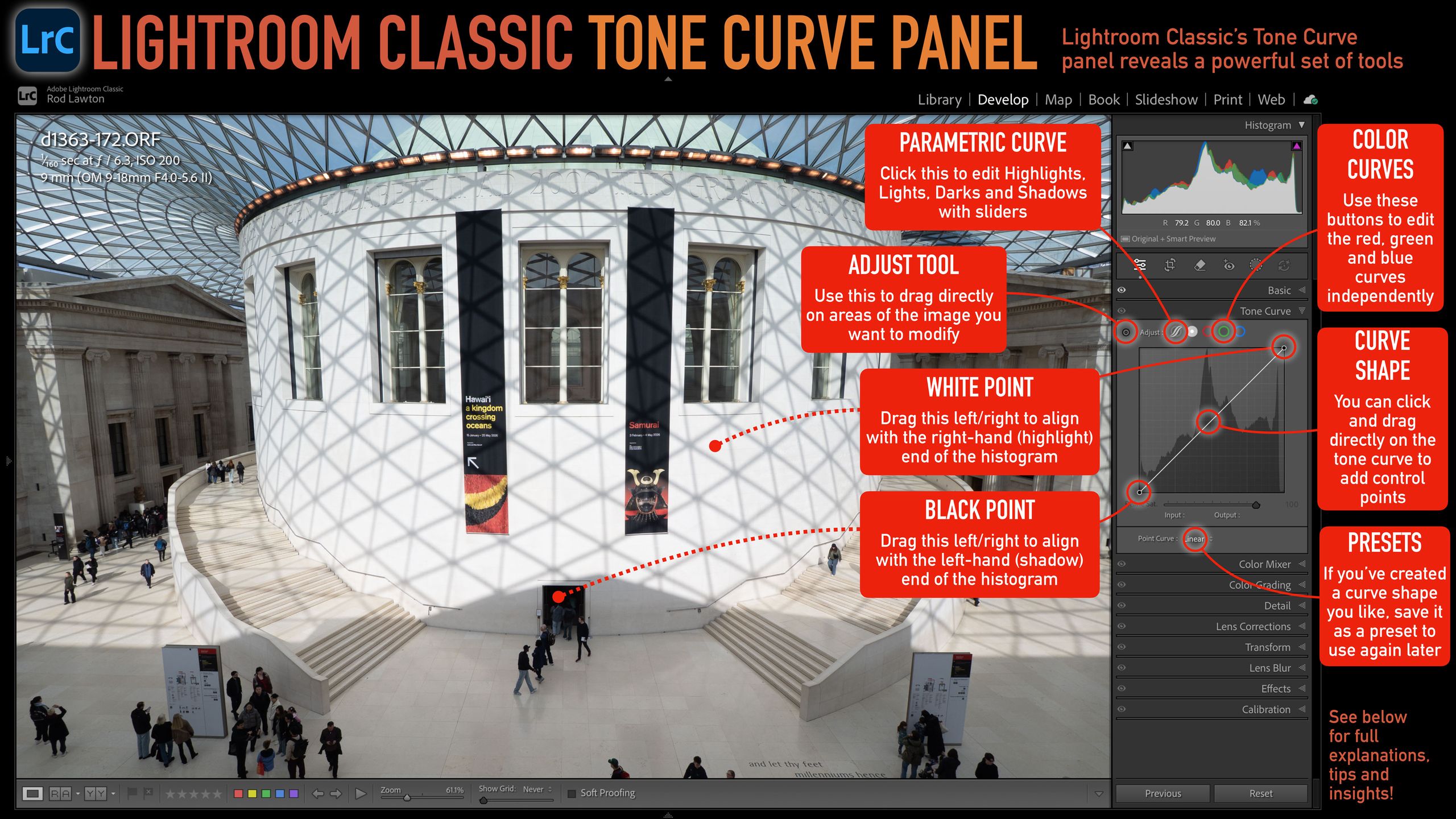
As photographers, we are constantly on the lookout for ways to enhance our images and develop our unique style. One of the most powerful yet often underutilized tools in Adobe Lightroom Classic is the Tone Curve. This essential editing panel allows you to control the tonal range of your photographs, offering a level of precision that can dramatically alter the mood and impact of your work. Whether you're a seasoned professional or a budding enthusiast, mastering the Tone Curve can elevate your post-processing game to new heights.
So why should you focus on the Tone Curve now? The digital photography landscape is ever-evolving, and as we transition into a new era of visual storytelling, the ability to manipulate light and shadow effectively has never been more critical. With the rise of social media and the demand for visually striking content, your images need to stand out. The Tone Curve is your secret weapon to create that stunning differentiation.
The Tone Curve panel in Lightroom is divided into two main sections: the graph and the sliders. The graph plots the input tones (from shadows on the left to highlights on the right) against the output tones. By adjusting the curve, you can fine-tune the brightness and contrast of specific tonal ranges. There are also presets available to quickly achieve certain looks, but customizing the curve gives you the ultimate control. For instance, creating an 'S' curve can increase contrast, making your images pop, while a gentle curve can create a softer, more ethereal feel.
To start utilizing the Tone Curve effectively, familiarize yourself with key concepts like the 'Point Curve' and 'Parametric Curve.' The Point Curve allows for precise adjustments by clicking directly on the curve, while the Parametric Curve lets you manipulate the tonal ranges using sliders for Highlights, Lights, Darks, and Shadows. Experimenting with these tools will help you understand how minor adjustments can yield significant results.
In addition to tonal adjustments, the Tone Curve can also influence color grading. By selecting the RGB channel, you can add color casts to your highlights, midtones, and shadows, creating a unique color palette that reflects your artistic vision. This is particularly useful when you want to evoke specific emotions or set the tone for a series of images.
Understanding how to read the histogram is another crucial aspect of utilizing the Tone Curve effectively. The histogram provides a visual representation of your image's tonal range, helping you identify areas that may be overexposed or underexposed. By keeping an eye on the histogram while making adjustments in the Tone Curve, you can ensure that your edits enhance rather than detract from the overall quality of your photograph.
As we delve deeper into the role of AI in photography, tools like Lightroom are continuously updating to incorporate advanced features. These innovations aim to simplify complex editing processes, but the fundamental skills of understanding light and shadow remain irreplaceable. The Tone Curve is a testament to the art of editing, allowing for creative expression that AI cannot replicate.
CuraFeed Take: Mastering the Tone Curve offers photographers a distinct advantage in a crowded digital space. While automated editing tools are on the rise, those who take the time to understand tonal manipulation will stand out. Keep an eye on future updates from Lightroom that may introduce even more sophisticated editing features, but remember that the essence of powerful photography lies in the mastery of fundamental skills. Embrace the learning process, and watch your photography transform!